 Hisashi Space
November 3, 2026 · 10 min read
UpdraftPlus Was Breached: Why Updating Won't Remove What Attackers Planted
Updating your plugins won't save you this time.
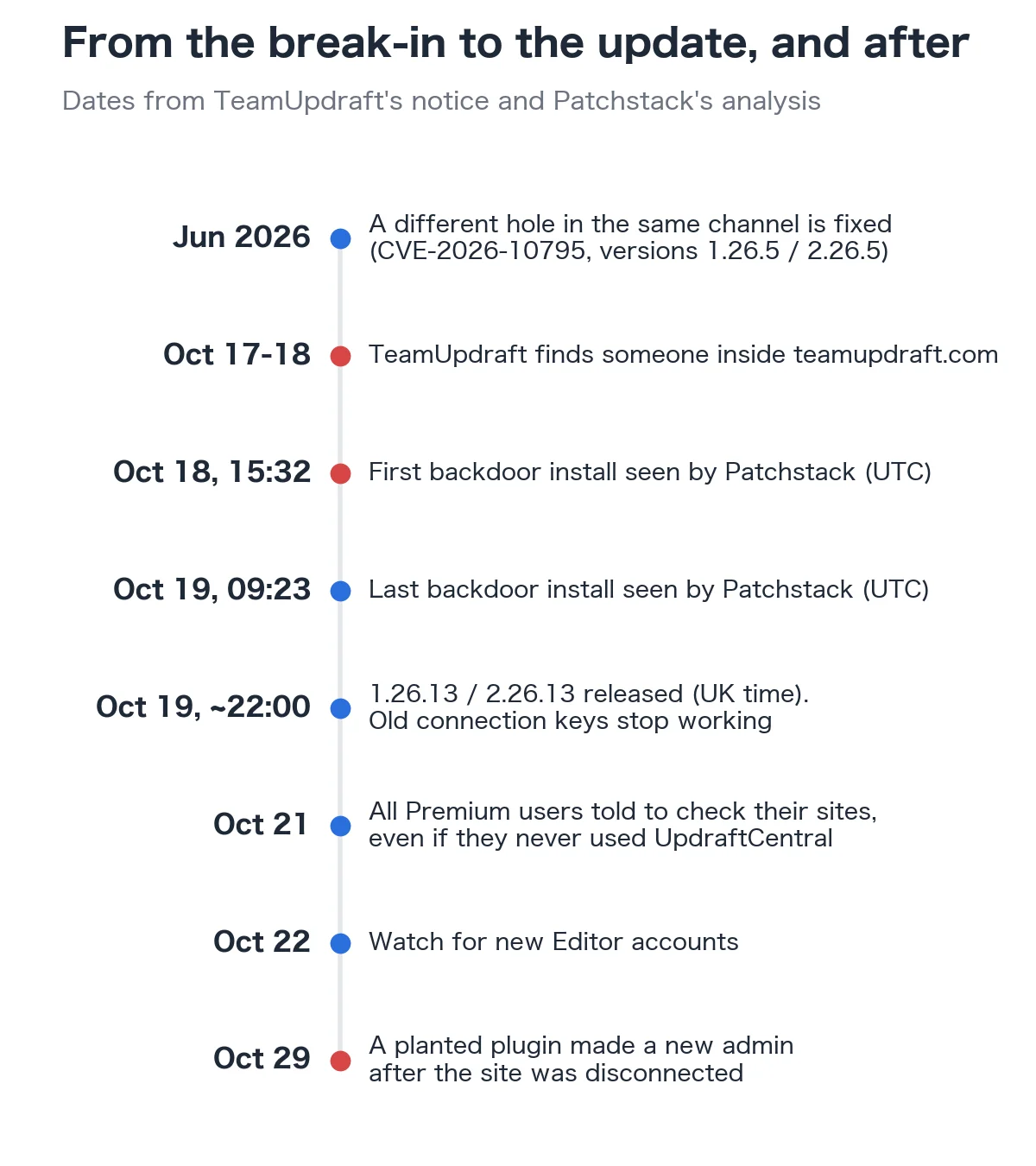
If you use UpdraftPlus to back up WordPress, this one matters. TeamUpdraft, the company behind it, was breached on the weekend of October 17 and 18, 2026, and stolen connection keys were used to plant backdoors on WordPress sites. I made a video about it with the five steps most people need. This article goes further: how the backdoor actually works, why it hides from the normal WordPress screens, and the commands to check a site properly, taken from TeamUpdraft's notice (updated up to October 29) and Patchstack's analysis.
I also made a video of this.

The short version
- Someone broke into teamupdraft.com. TeamUpdraft believes its customer database was accessed, including connection keys for UpdraftCentral, its remote management dashboard.
- With those keys, the attacker sent signed commands to connected sites and installed backdoor plugins. The sites accepted them, because the commands were genuine.
- UpdraftPlus 1.26.13 (free) and 2.26.13 (Premium), released on October 19, revoke the old keys. They do not remove anything already planted.
- The backdoor creates an account that looks like an Editor but can install plugins and change settings, and it logs in without the login form, so two-factor authentication never runs.
- Some planted plugins hide themselves and the accounts from the normal WordPress screens. On October 29 TeamUpdraft reported sites where a planted plugin created a new admin after the site was already disconnected.
- You may hold a key without knowing it: the box that adds your site to UpdraftCentral is ticked by default when you connect a TeamUpdraft account.
What happened at TeamUpdraft
Over the weekend of October 17 and 18, TeamUpdraft found unauthorized access to teamupdraft.com. It says its customer database was accessed, and that database holds:
- names, email addresses, billing addresses and order history
- account passwords, stored only in hashed form
- two-factor authentication settings
- connection keys for UpdraftCentral, UpdraftVault and UpdraftClone
No card details are stored there. Payments go through Stripe and PayPal. The plugin itself and its downloads were not affected. Backups sent to your own remote storage, such as Google Drive, Dropbox or Amazon S3, were not affected. Self-hosted UpdraftCentral was not affected either.
UpdraftPlus is big. Patchstack puts it at over four million active installations.
Why a stolen key is worse than a hack
UpdraftCentral lets you manage many WordPress sites from one dashboard: update plugins, run backups, remotely. Its client ships inside every copy of UpdraftPlus, free and Premium, and stays asleep until the site gets a key.
Here is how the key works, according to Patchstack. When a site gets a key, it creates an RSA key pair and stores the dashboard's public key. From then on, the site runs any command signed with the dashboard's private key, with the rights of the user who created the connection. Nobody confirms each command.
Those private keys live with the UpdraftCentral cloud service, not on your site. So the safety of every connected site rests on one thing: that the keys stay there. They didn't.
The attacker doesn't need to hack your site. Your site trusts that key, so it just does what it's told. Patchstack says the commands were correctly encrypted and signed, so every check in the plugin passed. That is why this is not a bug in UpdraftPlus, and why, for the first day, no plugin update could stop it.
You might have a key and not know it
This detail surprised me.
There are two ways a site gets an UpdraftCentral key. One is connecting it to an UpdraftCentral dashboard on purpose. The other is connecting your TeamUpdraft account inside the plugin, and on that screen there is a checkbox: "Add this website to UpdraftCentral (remote, centralised control), free for up to 5 sites." Patchstack found it is ticked by default in the plugin's code.
So a site that only ever used UpdraftPlus for backups can still hold a key. Patchstack also says keys don't expire: keys issued in November 2025 still worked in October 2026.
Maybe that's why, on October 21, TeamUpdraft told every Premium user to check their sites, even if they never used UpdraftCentral.
How the backdoor works
Patchstack's write-up, which builds on the first analysis by Nethemba, describes the backdoor step by step.
- The attacker sends a signed "upload plugin" command. WordPress installs and activates the plugin through its normal installer.
- The plugin hooks into WordPress early on every request and waits for a secret URL parameter carrying a 32 character token.
- When it sees the token, it creates an account with a hardcoded password and the Editor role, then quietly gives that account two more rights: manage options and install plugins.
- It logs the visitor straight in by setting a cookie, and sends them to the dashboard.
Three things make this nasty.
- The account shows as an Editor, so if you only look at your administrators, you miss it. But install plugins means it can run any code, and manage options means it can make itself an admin.
- Login happens by setting a cookie directly. The login form never runs, so two-factor authentication, login limits and login protection plugins never run either.
- The account outlives the plugin. Remove the plugin, and the attacker still has a working login with a password they know.
Patchstack saw installs between October 18 at 15:32 and October 19 at 09:23 (UTC), from addresses that changed within a day, so blocking IPs doesn't help. It counted 99 different plugin names. One, "Site Health Cache," came up again and again. The rest were random two or three word names. What they all shared was the same description line: "Small maintenance toolkit: keeps option storage tidy."
One more odd detail: the first samples had a coding error that crashed the site with an HTTP 500 error. That is how some owners noticed within minutes. Patchstack's warning: don't repair such a plugin. Fixing the error switches the backdoor on.
Why updating isn't enough
The fix sounds simple. UpdraftPlus 1.26.13 for the free version, 2.26.13 for Premium. It came out just after 10 pm UK time on October 19, and WordPress.org pushed it to everyone. It disconnects every UpdraftCentral connection made before 13:07 UK time on October 18, so the old keys stop working.
But TeamUpdraft says it plainly. Updating and disconnecting stop access through the old keys, but they do not remove malicious plugins, administrator accounts or other changes an attacker already made.
If the attacker got in, the account they made is still there. The plugin they planted is still there. Updating just locks the door after they've moved in.
And it got worse. On October 29 TeamUpdraft added that it had seen a small number of sites that were compromised during the original incident but showed no sign at the time. On those sites, the planted plugin stayed in place and later created a new administrator, after the site had already been disconnected from UpdraftCentral.
| Update to 1.26.13 / 2.26.13 | Delete keys yourself | Clean the site | |
|---|---|---|---|
| Stops the old stolen keys | Yes | Yes | No |
| Removes planted plugins | No | No | Yes |
| Removes hidden accounts | No | No | Yes |
| Ends logins the attacker already has | No | No | Only with new salts and passwords |
How hosts in Japan reacted
Here in Japan, the big hosting companies moved fast. Xserver, one of the largest in the country, put out a warning on October 20. Lolipop followed on October 21, listing the affected versions as 1.26.12 and below (free) and 2.26.12 and below (Premium).
Xserver's message was simple: go to Settings, UpdraftPlus, Advanced Tools, UpdraftCentral, and delete every connection key.
What to do today, step by step
This is the full version of the five steps in the video, from TeamUpdraft's notice. Do it on every site that has ever been connected to UpdraftCentral cloud, even if you already disconnected it and saw nothing unusual.
1. Update and remove the keys. Log in to the site's own dashboard, not through UpdraftCentral. Make sure UpdraftPlus is on 1.26.13 (free) or 2.26.13 (Premium) or later. Go to Settings, UpdraftPlus, Advanced Tools, UpdraftCentral, click "Manage existing keys" and delete them all. Removing the site from your UpdraftCentral dashboard is not enough. The key that matters lives on the site.
2. Look for planted plugins, including hidden ones. Check Plugins, including the Must-Use tab. Names TeamUpdraft lists as examples: Site Health Cache, Asset Forge 2, Core Smith, Data Engine Cc0, Image Forge, Quick Pack, Seo Helper, WP Forge. Because some of these hide from the Plugins screen, also look at the folders wp-content/plugins/ and wp-content/mu-plugins/ over SFTP, SSH or your host's file manager. Don't delete a suspicious plugin from the WordPress dashboard. Some of them erase their own traces when deleted that way. Deactivate it, then remove the whole folder through the file system.
3. Look for accounts, including hidden ones. Check Users for administrators and editors you don't recognize. Since some plugins hide accounts from that screen too, check outside the dashboard. Usernames seen so far look like data-ops43 and media-staff96. Patchstack also lists an email at example.org and the display name "Site Tools" as markers. Also look for database entries containing _sync_token.
4. End existing logins and change passwords. Reset your WordPress security keys and salts, so every existing login session ends. Then change the passwords of every real admin and editor, and your teamupdraft.com password. Type teamupdraft.com yourself. Don't click a link in an email. If you use two-factor authentication there, reset it in My Account.
5. Restore if you have to. If you find anything suspicious, consider restoring from a backup taken before October 17. If the site was accessed through UpdraftCentral, re-authorize your remote storage and change those storage keys too.
The commands, if you have a terminal
For anyone with WP-CLI or SSH, these are the checks from TeamUpdraft and Patchstack in one place.
# Do you still hold an UpdraftCentral key? Any output means yes
wp option get updraft_central_localkeys

# Delete the stored keys
wp option delete updraft_central_localkeys

# List admins and editors without loading plugins (so hidden accounts show)
wp user list --role=administrator --skip-plugins
wp user list --role=editor --skip-plugins

# Find the "editor" accounts that also have manage_options
wp db query "SELECT u.user_login,u.user_email FROM wp_users u
JOIN wp_usermeta m ON m.user_id=u.ID
WHERE m.meta_key='wp_capabilities'
AND m.meta_value LIKE '%editor%' AND m.meta_value LIKE '%manage_options%'"

# Look for the description line every known sample carries
grep -r "Small maintenance toolkit: keeps option storage tidy." wp-content/plugins/ wp-content/mu-plugins/

# End every existing login session
wp config shuffle-salts
If your table prefix isn't wp_, change it in the query. Not finding the description line does not prove the site is clean. The next wave can use new text.
The bigger lesson
This is the second problem in this same channel in five months. In June 2026, a different hole (CVE-2026-10795) let attackers forge UpdraftCentral commands with no key at all. It was fixed in 1.26.5 and 2.26.5.
Every tool that can manage your site remotely holds a key to your site. And that key can be stolen from the company, not from you.
Patchstack found one detail that stopped the attack on one analyzed site: the key had been created under an account that could not install plugins. So if you do need remote management, connect it with the weakest account that still does the job. And once in a while, look at everything connected to your WordPress. If you don't use it anymore, disconnect it.
Tired of maintaining WordPress?
If you're thinking, honestly, I'm tired of babysitting WordPress, I get it. That's why we built LynxPress, a blogging platform with no plugins to update and no server to maintain. Pages are static, so there's very little to attack. You can bring your WordPress posts with you, and there's a free plan: https://lynxpress.com/
Did you find anything strange on your sites? Tell me in the comments on the video. I read every one, and I'll reply.
Sources: TeamUpdraft, "Security incident on teamupdraft.com" (original post October 19, updates to October 29, 2026); Patchstack, "Stolen UpdraftCentral Keys Are Backdooring WordPress Sites" (October 19, 2026), which credits Nethemba's first analysis; Xserver notice (October 20, 2026, Japanese); Lolipop notice (October 21, 2026, Japanese). Read on November 2, 2026.