 Hisashi Space
September 15, 2026 · 7 min read
I made my SaaS usable from ChatGPT and Claude with a single sign in. What adding MCP taught me about the chat window front door.
Talking to an AI and having your other tools move is quickly becoming normal. You ask for the cards due this week and it reads your task manager. You ask it to turn the decisions in your meeting notes into cards, and the cards appear. A trip through three screens becomes one line of conversation.
The thing underneath most of this is MCP, the Model Context Protocol. It is a shared contract between AI assistants and outside tools. Build one endpoint that speaks it and any assistant that also speaks it can call you. It is a genuinely good design.
I run as much of my work as I can from Claude Code. Drafting email, adding calendar events, deploying servers, checking admin dashboards: I ask in a conversation and it gets done. Pinateca, the task manager I build, already had an MCP endpoint that took an API token, and I had been driving it from Claude Code for a while.
I believe we are leaving the era in which people operate software by touching its screens. People will ask an AI, and the AI will move the tools. When that happens, a tool an AI cannot use will not be chosen.
So this time the work was not for me. It was for ordinary users: making Pinateca usable from the ChatGPT and Claude chat windows.
The first version only worked from Claude Code
The first version authenticated with an API token. You created a token in workspace settings and pasted it into your assistant's configuration. Every developer has done this a hundred times.
From Claude Code it takes one command. Listing boards and creating cards happens right inside the conversation. For my own use, that was enough.
Then I tried to connect from ChatGPT the way an ordinary user would, and stopped. There is no field for a token. claude.ai normally has none either. The option to send a fixed token header there was a beta for a limited set of organizations when I checked.
What I had built reached people who run Claude Code in a terminal. Most people who manage tasks never open a terminal.
Chat products connect by sign in and allow, not by token
The reason turned out to be simple.
OpenAI's developer documentation states that ChatGPT cannot present custom API keys. When you add your own MCP server, the authentication choices are OAuth, no authentication, or a mix of the two. Custom connectors in claude.ai are built around OAuth as well.
OAuth is the same idea as a "Sign in with Google" button. You add a tool in the assistant, the tool's own sign in page opens, you sign in with your usual account and press allow. From then on the assistant can use the tool as you.
You cannot ask an ordinary chat user to generate a token and paste it somewhere. So the door is a sign in page. Obvious, once I saw it.
I also found something embarrassing. My own guide said ChatGPT and Gemini could connect "just by reading the spec URL". I had never tested that sentence. Worse, the published API spec still pointed its server address at my development machine, so anything that read it would have failed on the first call.
What I built
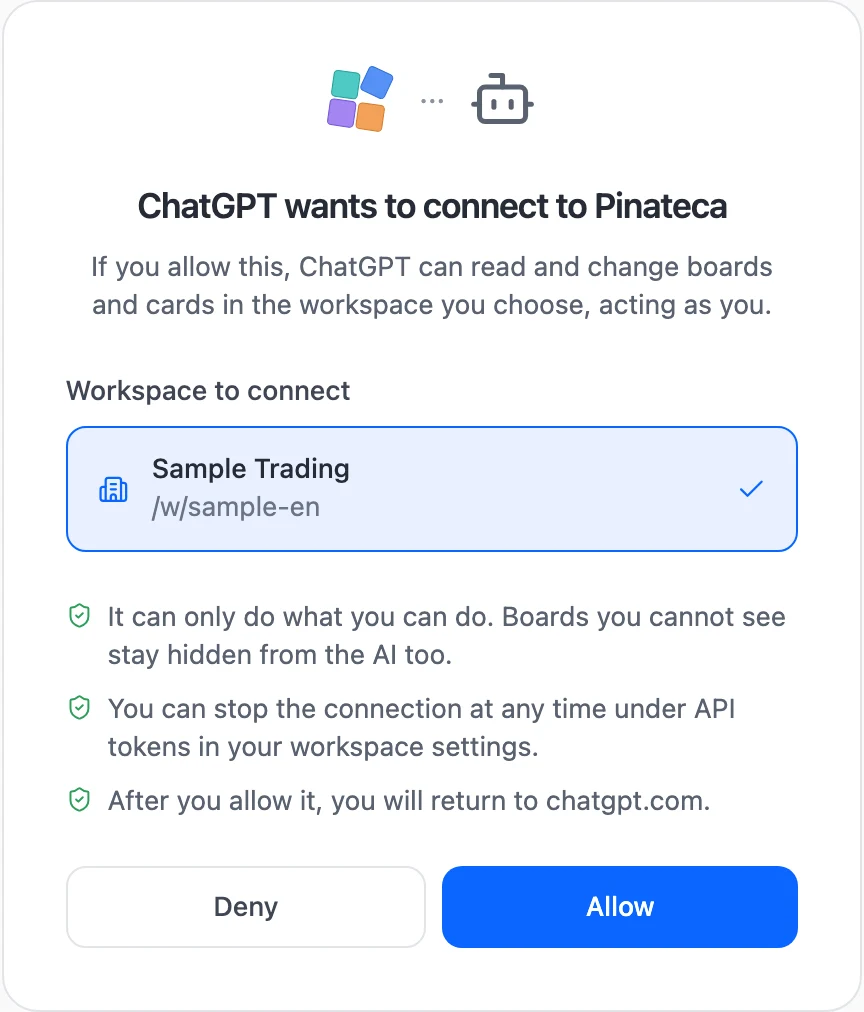
The MCP endpoint now supports sign in and allow. For the person connecting, it is three steps:
・Add the Pinateca address in the assistant's settings ・The Pinateca sign in page opens, sign in and choose a workspace ・Press Allow
On the building side I settled five things:
・The key handed to the assistant acts as the person who allowed it ・It cannot touch billing or create tokens ・It expires after an hour and the assistant swaps it for a fresh one ・Every connected assistant is listed by name under API tokens in workspace settings ・Assistant actions go through the same door as clicks in the app
The first one was the least debatable. If the key ran with admin rights, a regular member could grant an assistant powers they do not have themselves. Boards you cannot see stay invisible to the assistant.
The second draws a line: money and keys are handled by a person, on screen.
The third rotates both the key and the refresh token on every swap, and the moment someone leaves the workspace their key stops working.
The fourth is where you go to stop one. Revoke it there and that assistant is out.
The fifth means a card moved by an assistant shows up in the activity log and in outgoing notifications exactly like a card moved by hand.
This is the page that opens when an assistant connects:
One thing caught me out along the way. An assistant starts by calling the MCP endpoint with no key at all. The server is supposed to answer "you need a key, and here is where to get one", and that answer is what starts the sign in. My server was stopping that first call at its CSRF check instead, so it answered "request refused", and the assistant had nowhere to go. Moving the MCP and sign in routes in front of that check fixed it.
Connecting the real ChatGPT and Claude, in production
Local tests cannot tell you whether a real chat product gets through. So after deploying, I connected both with my own accounts.
In claude.ai I added a custom connector with the address. The Pinateca allow page opened, I allowed it, and all twelve Pinateca tools appeared in Claude.
ChatGPT takes more steps. When I went through it, the flow was:
・Be on a paid plan ・Turn on developer mode under Security and login in settings ・Open the plugins page, choose to create an app, and enter the address ・Tick the box saying you understand the risk, and create it ・Sign in to Pinateca and allow
The developer mode switch carries a warning that it raises your risk. Once I entered the address, OAuth was selected on its own.
Pinateca's icon then showed up in ChatGPT's plugin list, and my server logs showed ChatGPT fetching the tool list.
There was one thing I set up in advance because of how ChatGPT behaves. Unless the sign in metadata lists offline_access, ChatGPT does not ask for a refresh token, and the person has to sign in again every time the key expires. OpenAI's help center says so, so I listed it before anyone hit it.
Ordinary users arrive only through the directory
So it connects. But nobody should have to go through those five steps, and developer mode is described as a setting that lets you add unverified connectors.
That changes once an app is in the ChatGPT app directory. A listed app has been through review, and in the plugins page you press install and sign in.
Nothing gets listed on its own. You submit, and OpenAI reviews it. When I checked, the requirements were:
・A verified developer identity, as an individual or a business ・A demo account for reviewers, with sample data ・A privacy policy covering what is collected, why, who receives it, how long it is kept, and what users can control ・On every tool, labels saying whether it only reads, whether it changes things, and whether the change is destructive
Demo accounts that need a new sign up or two factor authentication are rejected. The tool labels, called annotations, are named as a common reason for rejection when they are missing or wrong.
All twelve Pinateca tools now carry them, and their descriptions are in English so a reviewer can read them. The privacy policy now says where information goes when you connect an AI assistant.
As I write this, the business verification is submitted and I am waiting on it.
What about other assistants
I looked at others too. Again, this is as of when I checked, and ChatGPT and Claude are the only two I have actually connected.
・In the Gemini web app, adding your own MCP server is possible only inside Gemini Spark ・Microsoft Copilot Studio offers an option that registers itself and signs in automatically ・GitHub Copilot in VS Code supports adding a server by address and signing in
Gemini Spark's custom apps were limited to people in the United States, 18 or older, on a personal Google account, using English.
The common door across all of them is sign in and allow. Build that once and the same endpoint serves every one.
Who this is for
If your SaaS already has an API and you want AI assistants to use it, this is the path. A token endpoint reaches developers. Reaching people in chat products needs sign in and allow. Reaching ordinary users means the directory submission is part of the same job, not an afterthought.
If everyone who will ever use your tool is an engineer working in a terminal, a token endpoint is enough.
Pinateca can now be driven from ChatGPT and Claude by just asking. How to connect, and what it can do: