 Hisashi Space
November 4, 2026 · 12 min read
Should You Block GPTBot? I Let ChatGPT In. What It Did to My Traffic, and How to Get Mentioned by ChatGPT

Should you block AI from learning from your site? Or let it in?
Every site owner is asking this right now. A lot of big sites chose to block. They don't want their work used for free. I get it.
I went the other way, on purpose. This article is about what happened after that, on a freelance job site in Japan that I have run since 2004.
I made a video about it. This article has the parts a video can't hold: the robots.txt I actually use, what OpenAI's own documentation says about each bot, how to check your logs and analytics for ChatGPT traffic, and each step written out so you can copy it.

The short version
- In March 2026 I opened my site to AI bots by name in robots.txt, including GPTBot, the one that collects training data.
- The share of new members who came from ChatGPT rose from 3.7% in April to 24.5% in September. These are sign-ups, not page views.
- From June, ChatGPT stopped sending people mostly to blog articles and started sending them to single job listings.
- For months my own admin screen could not see it. The fix was to read utm_source=chatgpt.com on the landing URL, not only the referrer.
- What I do so ChatGPT can find and mention my pages is eight ordinary things. None of it is a trick. I can't tell you which one did it.
Block AI training, or let it in?

On March 28, 2026, I told the AI bots by name in robots.txt that they are welcome. Then I made the whole site easy for AI to read.
My reasoning was simple. People are starting to ask AI instead of searching. If AI can't read your site, then for those people, your site doesn't exist.
I didn't only allow the search bots. I allowed GPTBot too, the training one. I want ChatGPT to know my site before anyone asks.
ChatGPT traffic: four effects I saw
Every number here is a share, recounted from the raw sign-up records (April 1 to September 26, 2026, Japan time). A sign-up counts as "from ChatGPT" if the landing URL had utm_source with chatgpt or openai, or the referrer was chatgpt.com or openai.com.
Effect 1: more sign-ups, not just more page views
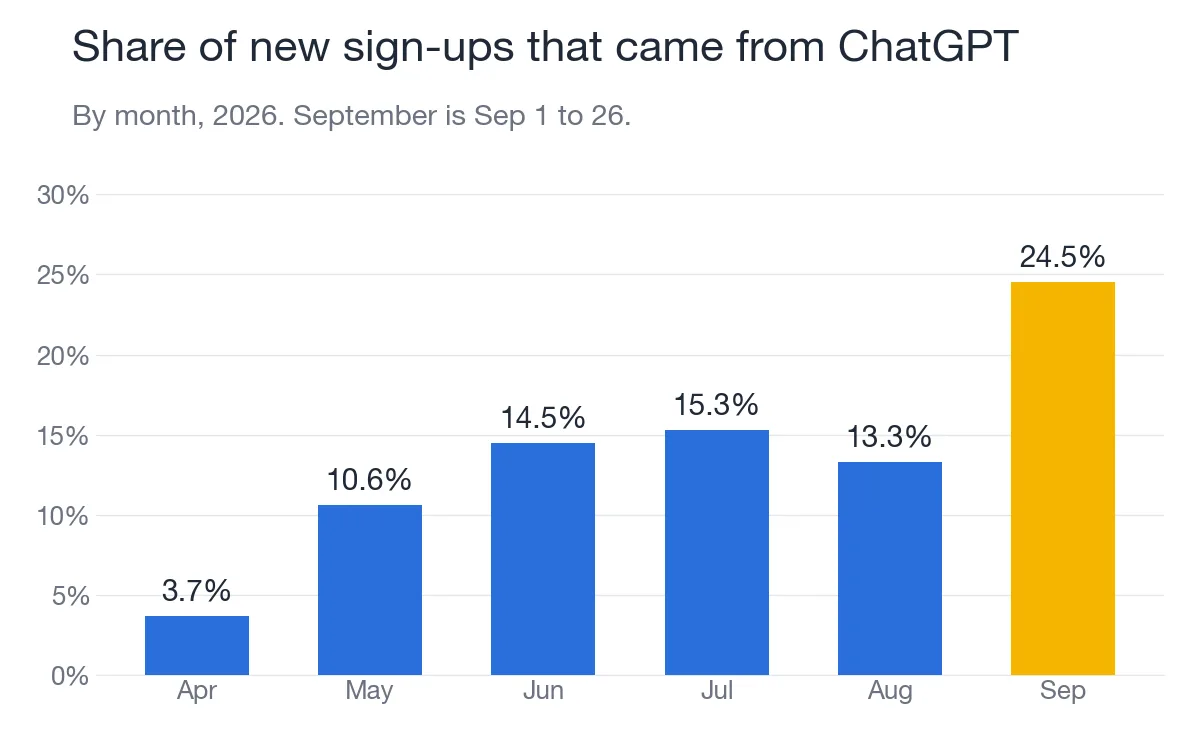
| Month (2026) | Share of new sign-ups from ChatGPT |
|---|---|
| April | 3.7% |
| May | 10.6% |
| June | 14.5% |
| July | 15.3% |
| August | 13.3% |
| September (1st to 26th) | 24.5% |
In the last week I counted, the week of September 21, it was one in three.
These are people who actually created an account. Someone asked ChatGPT something, clicked a link, and decided to join.
Effect 2: it's almost all ChatGPT
Over the same months, Perplexity, Gemini, Copilot and Claude together were 1.4% of sign-ups. ChatGPT alone was 14.6%.
Effect 3: ChatGPT points at one specific page
This one surprised me the most.
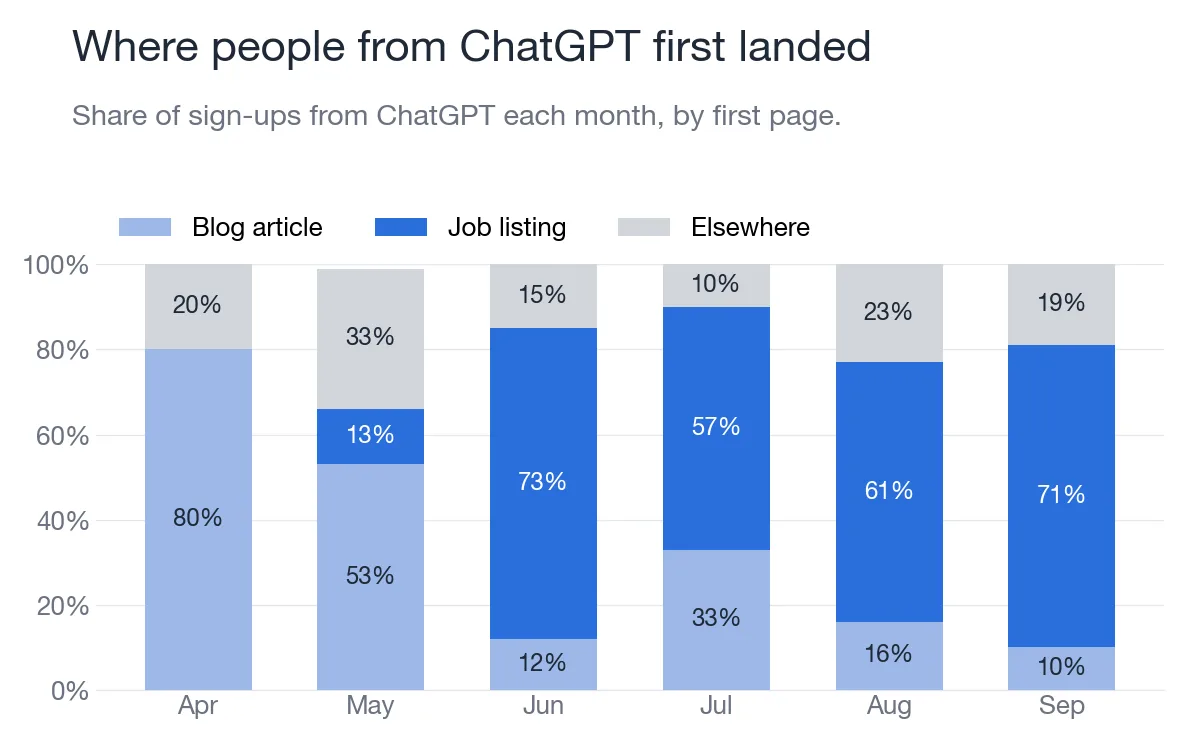
| Month (2026) | Blog article | Single job listing | Elsewhere |
|---|---|---|---|
| April | 80% | 0% | 20% |
| May | 53% | 13% | 33% |
| June | 12% | 73% | 15% |
| July | 33% | 57% | 10% |
| August | 16% | 61% | 23% |
| September | 10% | 71% | 19% |
(Share of sign-ups from ChatGPT in each month, by the first page they landed on.)
In April, most people landed on blog articles. That's normal. That's what search does.
Then in June it flipped, in one month.

People are asking ChatGPT for work, and ChatGPT is pointing them at one specific job. That's not a search engine sending traffic to an article. That's ChatGPT recommending my pages, like a salesperson.
Which means your most specific pages matter. Not just your blog. The pages that answer exactly what someone asked.
Effect 4: ChatGPT finds new pages faster than Google
I have ten test sites that aren't linked from anywhere. OpenAI's bots visited eight of them. Google's bot visited none. Not once.
On the day one of them went live, OpenAI's search bot arrived 38 minutes after the first request. Before a single article. Before a single link.
I counted only bots whose IP address matched the ranges each company publishes. How to do that check is in Step 2 below.
Why analytics can't see ChatGPT traffic

For months, I couldn't see any of this. My own admin screen was telling me ChatGPT barely mattered. There were two reasons.
| What went wrong | What my screen showed | Fix |
|---|---|---|
| My code checked whether the referrer contained a known domain. chatgpt.com contains the letters t.co, which is X's link shortener. | ChatGPT visits were counted as X. | Match the whole host name, not a piece of the string. I fixed this on April 18. |
| Two thirds of the people who signed up from ChatGPT arrived with no referrer at all. | "unknown" | Read utm_source on the landing URL first. 98% of them had utm_source=chatgpt.com. I fixed this on August 24. |
Lucky for me, the site had been saving the landing URL for every new member since April 4. It stores the referrer and the landing URL in a cookie on the first visit, keeps them for 30 days, and writes them to the member's record at sign-up. So I could go back and recount everything.
How to check your own site
- If you use an analytics tool that reads utm tags: look for chatgpt.com in your traffic sources.
- If you built your own tracking: read utm_source on the landing URL first. Fall back to the referrer only when there is no tag.
- When you match a referrer, compare the host name exactly. A plain "contains" check is how chatgpt.com turned into X for me.
- If you have raw server logs, search the request URLs, not only the referrer field. For example:
grep "utm_source=chatgpt.com" access.log - Save the landing URL with each sign-up or order. Without it, you can't recount later.
I wrote the first version of this story in September. That post has every change listed by date. This one is about how to do it yourself.
How to get mentioned by ChatGPT: what I do
So now the real question. How do you get ChatGPT to mention you? Here's exactly what I do. None of it is a trick.
Step 1: let the right bots in (GPTBot, OAI-SearchBot, ChatGPT-User)
This part trips people up. OpenAI runs different bots, and blocking one does not block the others.

Here is what OpenAI's own page, "Overview of OpenAI Crawlers", says (read November 4, 2026).
| Bot | What it's for, in OpenAI's words | If you block it |
|---|---|---|
| GPTBot | "used to crawl content that may be used in training our generative AI foundation models" | "Disallowing GPTBot indicates a site's content should not be used in training generative AI foundation models." |
| OAI-SearchBot | "used to surface websites in search results in ChatGPT's search features" | "Sites that are opted out of OAI-SearchBot will not be shown in ChatGPT search answers", though they "can still appear as navigational links" |
| ChatGPT-User | "When users ask ChatGPT or a CustomGPT a question, it may visit a web page with a ChatGPT-User agent." | "Because these actions are initiated by a user, robots.txt rules may not apply." |
Three more lines from the same page worth knowing:
- "Each setting is independent of the others." You can allow search and block training, or the other way around.
- "it can take ~24 hours from a site's robots.txt update for our systems to adjust."
- OpenAI recommends "allowing requests from our published IP ranges" so your site can appear in search results.
If you block the search bot and the user bot, ChatGPT can't send you anyone. I chose to allow all three, even the training one.
This is the AI part of my robots.txt:
User-Agent: GPTBot
User-Agent: ChatGPT-User
User-Agent: OAI-SearchBot
User-Agent: ClaudeBot
User-Agent: Claude-SearchBot
User-Agent: Claude-User
User-Agent: PerplexityBot
User-Agent: Google-Extended
Allow: /
Disallow: /_admin/
Disallow: /api/
I also allow the Claude bots, Perplexity, and Google's AI crawler. And I still block the admin area and the API. Allowing AI doesn't mean opening everything.
Step 2: don't trust the robots file alone (firewall and fake bots)

Check your firewall and your bot protection too. From September 22 to 24, my own server was returning 403 to some of OpenAI's requests, and the robots file said nothing was wrong.
What to look at:
- Your CDN's bot settings (for example, Cloudflare's AI crawler and bot rules)
- WAF custom rules and rate limits on your own server
- Hand-made IP allowlists. OpenAI updates its lists. gptbot.json changed on September 22 and chatgpt-user.json on September 25. Pull them from the URLs instead of copying them once.
And watch out for fakes.

In my test logs, 3,305 requests came from bots borrowing the names of OpenAI or Google. Anyone can type any user agent. Before you trust a bot's name, check where it really comes from.
| Bot | OpenAI's published IP list |
|---|---|
| GPTBot | https://openai.com/gptbot.json |
| OAI-SearchBot | https://openai.com/searchbot.json |
| ChatGPT-User | https://openai.com/chatgpt-user.json |
Each file is a list of prefixes, like "ipv4Prefix": "132.196.86.0/24".
If the user agent says GPTBot but the IP is in none of these ranges, it is not OpenAI.
Step 3: put what you want quoted in the first HTML

Put what you want quoted in the HTML the server sends first: the body, the title, the dates, the prices. If your page loads its main content with JavaScript after it opens, a bot may only see an empty shell.
A quick check: fetch the page without a browser and see whether the text is there.
curl -s -A "OAI-SearchBot" https://your-site/page | grep "a sentence from your page"
If nothing comes back, the bot may not see it either.
Step 4: structured data on every kind of page
| Page | JSON-LD type | Keep it honest |
|---|---|---|
| Blog article | Article | Correct publish and update dates |
| Article with Q&A | FAQPage | Only questions the page really answers |
| Every page | BreadcrumbList | Matches the real site structure |
| Open job | JobPosting | Shows the deadline, and that the work is remote |
| Closed job | No JobPosting | Only a publish date for machines. It stops claiming to be open |
| List of jobs | CollectionPage and ItemList | So a machine can tell a list from a single job |
I even added it to the list pages, so a machine can tell a list of jobs from a single job. That's how ChatGPT can point at one exact listing.
Step 5: make every article easy to quote
- A short "key points" box at the top of every article
- A real FAQ page, with the questions people ask before they sign up, each with a short, direct answer
Step 6: connect Bing
ChatGPT search leans on Bing. So I connected Bing Webmaster Tools, and every new page is sent to Bing through IndexNow the moment it goes live.
Step 7: show who's behind it
- Under every article: who reviewed it, when it was published, when it was updated
- An editorial policy page
- A company information page
- I even fixed a bug where dateModified in the structured data was stuck on the publish date
Step 8: link your pages to each other

Pages that only exist in your sitemap get pushed to the back. Link related pages, so a bot that reads one finds the next.
llms.txt: does it matter?
I have one. I put it at the root of the site on September 20. OpenAI's bots read it about once every few days. It doesn't look like it decides anything. It doesn't hurt. But do the other things first.
If you want one anyway, here is the format from the proposal at llmstxt.org (by Jeremy Howard, published September 3, 2024):
| Order | Part | Required? |
|---|---|---|
| 1 | An H1 with the name of the site | The only required part |
| 2 | A blockquote with a short summary | Optional |
| 3 | Paragraphs or lists, no headings | Optional |
| 4 | H2 sections, each a list of links: [name](url): notes |
Optional |
| 5 | An H2 called "Optional" for links an agent can skip | Optional |
Mine follows that shape. Here is the same structure for a made-up job site:
# Example Jobs

> A job board for remote and part-time work.
> Besides finding work, people use it to look up pay and templates.

## Find work

- [Job listings](https://example.com/jobs): open jobs, filtered by role and work style

- [Job guide](https://example.com/jobs-guide): what each role does and the skills it needs

## Read

- [Blog](https://example.com/blog): practical articles on freelance and side work

## Good to know when quoting

- Each job page shows the date it was posted

- Closed job pages stay up as examples of past work

## Optional

- [Contact](https://example.com/contact)
The proposal also suggests a plain markdown copy of each page at the same URL with .md added.
What I can't prove
I can't tell you which step did it.
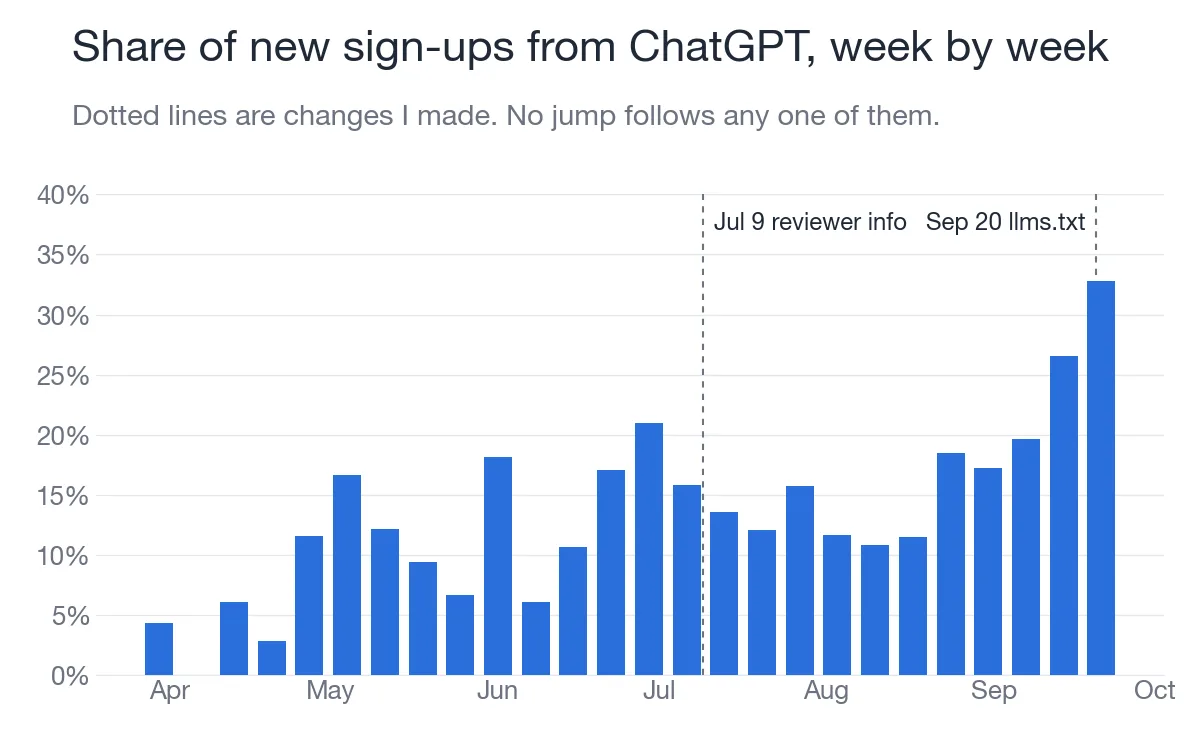
Look at the weekly chart. There's no jump the week after any single change. It climbs slowly, with a lot of noise. The last two weeks were the highest.
And this is one site, in one country, in one kind of business. Your numbers will be different. If someone tells you one trick gets you into ChatGPT, I'd be careful.
What to check this week
- Are the ChatGPT bots allowed, in your robots file and in your firewall?
- Is your site saving the landing page address?
- Are your most specific pages readable and accurate?
Everyone was asking whether to block AI. I let it in, and made it easy to read. And now ChatGPT is the one sending me people.
Sources: OpenAI, "Overview of OpenAI Crawlers" (developers.openai.com/api/docs/bots, read November 4, 2026). OpenAI's IP lists gptbot.json, searchbot.json and chatgpt-user.json. Jeremy Howard, "The /llms.txt file" (llmstxt.org, read November 4, 2026). My own sign-up records (April 1 to September 26, 2026, Japan time) and server logs.