 Hisashi Space
November 15, 2026 · 15 min read
ChatGPT Business Hub: What to Do Before You Claim Your Business
Do you want to know whether ChatGPT mentions your business, and what happens after it does? OpenAI has just announced a page for exactly that, and every tutorial shows you where to click.
I made a video about what the page gives you and what it cannot show you. This article has what the video has no room for: the wording on OpenAI's own page, the exact lines to check in your robots file, a test for your firewall and for your page source, the code and the database column for saving the first landing URL, a weekly log you can copy, and what I did not test.
The short version
- OpenAI calls it Businesses in ChatGPT. It is in beta. A business registers its information, and OpenAI says it can then see how often ChatGPT mentioned it, how many people clicked through to its website, and the topics where its website is cited.
- Those numbers are ChatGPT's own count, taken on ChatGPT's side of the door. Your sign-ups and purchases are a different count, and only your own records have it.
- Before you press "Claim your business", do three things that need no Hub: let OpenAI's bots in, save the first landing URL of every new customer, and put the main text of your most specific pages in the first HTML.
- The three take one afternoon.
- After you claim, write down four numbers every week and put the two sides next to each other.
- The size of the effect on my own site is one site in one country. Yours will be different. I give it only to show why the counting matters.
I have run a freelance job site in Japan since 2004, and my company for 22 years. I count every sign-up from the raw records. I have not claimed a business in the Hub myself, so everything below about the Hub is what OpenAI's own pages say, and the bot facts are from OpenAI's crawler documentation, which I read on November 15, 2026.
What the Business Hub is
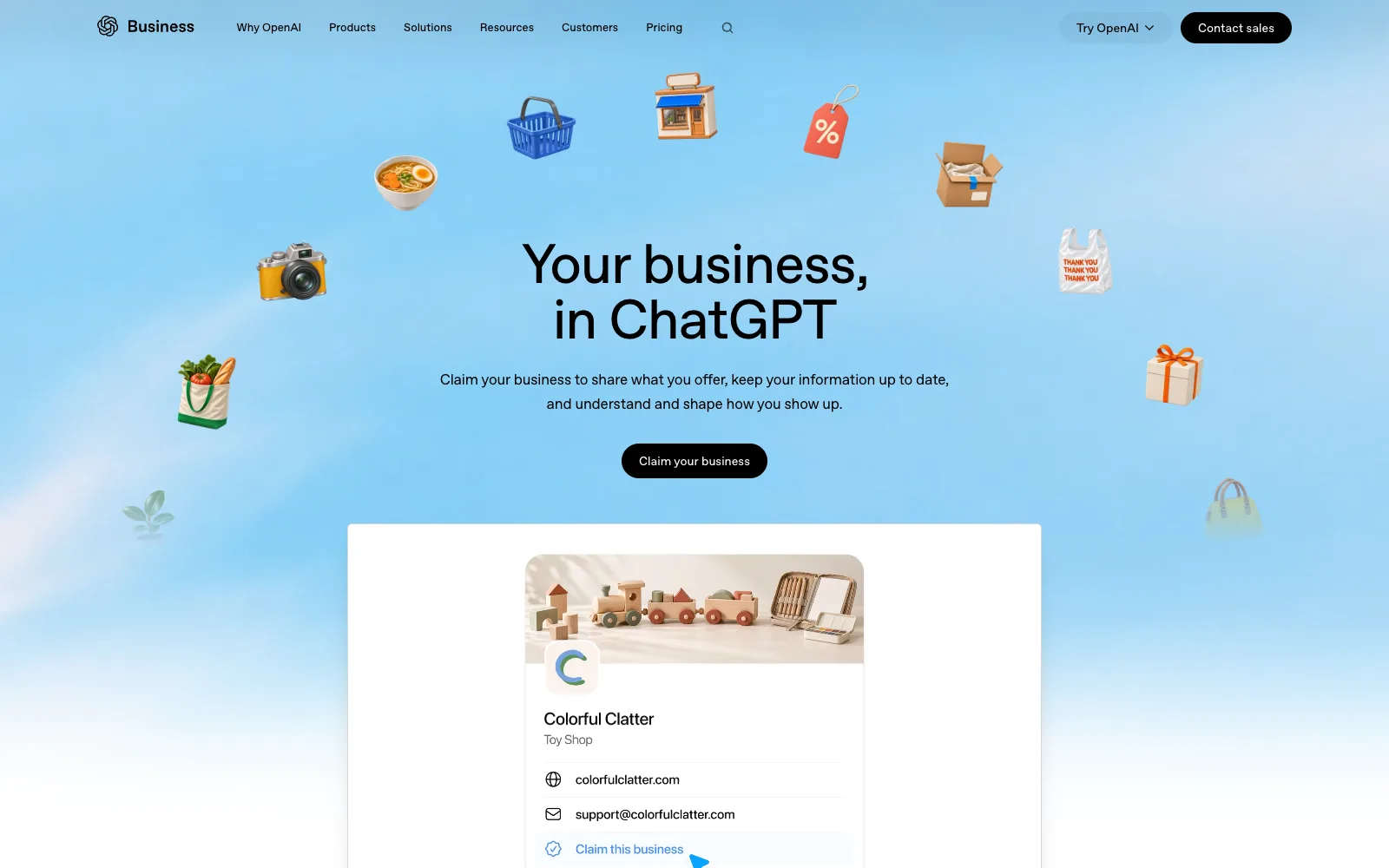
The headline on OpenAI's page is "Your business, in ChatGPT". The line under it says: "Claim your business to share what you offer, keep your information up to date, and understand and shape how you show up." So the Hub is a page where a business registers its information with ChatGPT and keeps it current.
What OpenAI says you get once you are registered:
| What you see | What it counts |
|---|---|
| Mentions | How many times ChatGPT mentioned your business |
| Website clicks | How many times people clicked through to your website |
| Discovery topics | The topics where your website is cited, with the number of mentions and the share for each |
| Profile views | Shown in OpenAI's example (below). I did not see it described in words, so I do not know exactly what it counts |
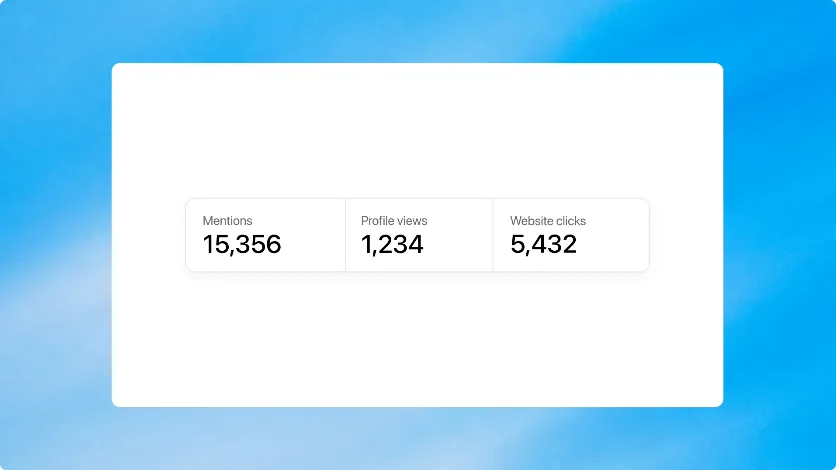
The numbers in that picture (15,356 mentions, 1,234 profile views, 5,432 website clicks) are OpenAI's sample for a made-up toy shop. They are not a benchmark, and I do not use them as one.
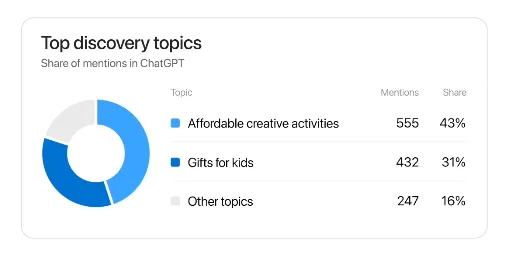
This is the kind of report you receive: topics on the left, number of mentions in the middle, share on the right. It is the missing half of the picture. Until now you only saw people after they arrived on your site.
There is a second part, the Business Agent. Some businesses in the US, such as online shops and online services, can create an AI chat for their customers inside ChatGPT. When someone clicks your business name in an answer, a business page opens, and if you made an agent they can ask about your products there. OpenAI says that chat is clearly separated from the original chat. I did not look at the agent further, because the report is what this article is about.
Who can claim a business
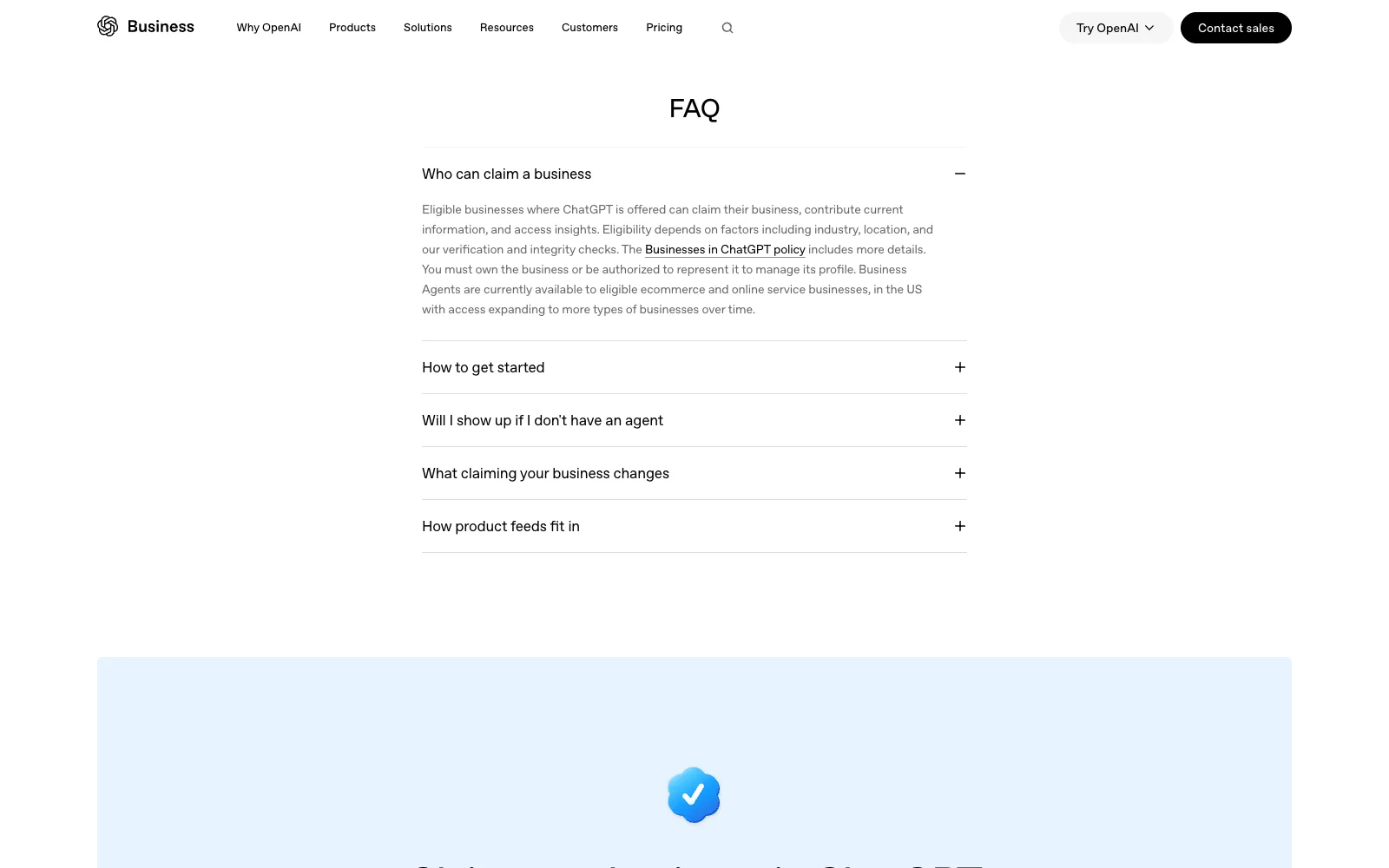
This is the FAQ on OpenAI's page, word for word: "Eligible businesses where ChatGPT is offered can claim their business, contribute current information, and access insights. Eligibility depends on factors including industry, location, and our verification and integrity checks." "You must own the business or be authorized to represent it to manage its profile." "Business Agents are currently available to eligible ecommerce and online service businesses, in the US with access expanding to more types of businesses over time."
So there are two separate gates:
| Report (mentions, clicks, topics) | Business Agent | |
|---|---|---|
| Where | Where ChatGPT is offered | Eligible ecommerce and online service businesses in the US, for now |
| Who | Eligible businesses. Depends on industry, location, and OpenAI's checks | Same, plus the type of business |
| Your side | You must own the business or be authorized to represent it | Same |
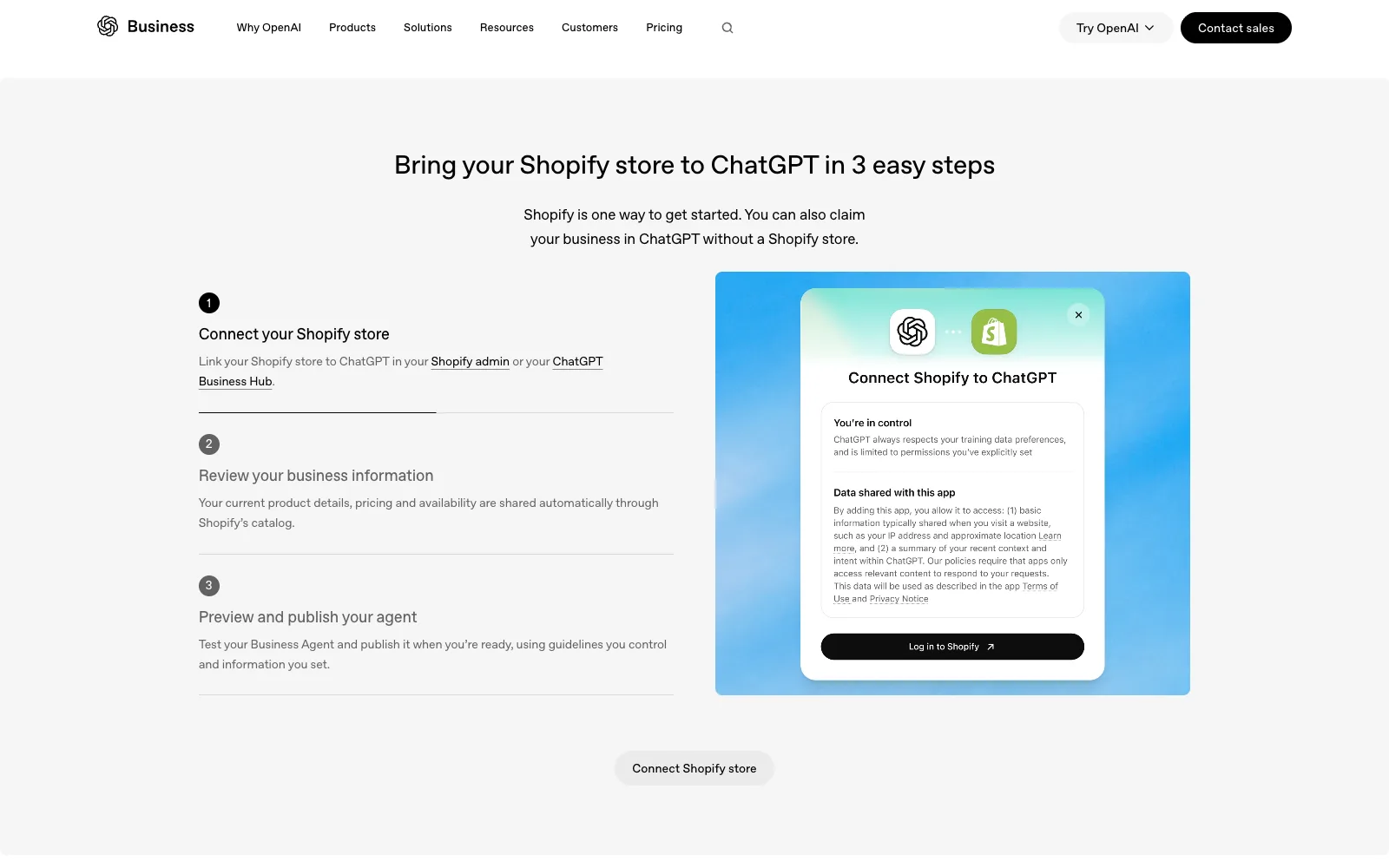
Large companies on the Enterprise plan work with an OpenAI contact. If you use Shopify, OpenAI's page shows three steps: connect your store, review your business information, and preview and publish your agent. The page also says: "Shopify is one way to get started. You can also claim your business in ChatGPT without a Shopify store."
Why the report shows only one side of the door
Think of ChatGPT as a very busy reader. It reads a lot of pages and then answers people. It never visits your shop. It only knows what it read. The Hub is a way to tell that reader who you are in your own words, and to get a report on how often the reader used you.
Notice what the report is made from. It is ChatGPT's own count of mentions and clicks, on its side of the door. Your own site has its own count: who actually arrived, who signed up, who bought. The two will not match, and they should not.
A mention is not a click. A click is not a visit that stayed. A visit is not a sign-up. Each step loses people.
Here is an illustration, not a measurement. Say the report shows 100 mentions and 10 clicks. Is that good? You cannot tell from those two numbers. It depends on what happened to the ten people next.
| Step | Whose count | Where it comes from |
|---|---|---|
| Mention | ChatGPT's | The Hub report |
| Click to your site | ChatGPT's | The Hub report |
| Visit that stayed | Yours | Your analytics or server logs |
| Sign-up or purchase | Yours | Your own records |
The Hub stops at the door. Your records start at the door. Only the two together tell you what happened.
Why I care about the counting: my own records
I opened my site to AI on purpose, and I recounted every sign-up from the raw records. The period is April 1 to September 26, 2026, Japan time. A sign-up counts as "from ChatGPT" if the landing URL had utm_source with chatgpt or openai, or the referrer was chatgpt.com or openai.com.
| Measure (share of new sign-ups) | Value |
|---|---|
| From ChatGPT in April | 3.7% |
| From ChatGPT in September (1st to 26th) | 24.5% |
| From ChatGPT in the best week I counted | About 1 in 3 |
| Perplexity, Gemini, Copilot and Claude together, April to September | 1.4% |
| ChatGPT alone, same period | 14.6% |
These are people who created an account. They are not page views. It is one site, in one country, in one kind of business. Your numbers will be different.
The second reason is the one that changes what you do. The pages ChatGPT sent people to changed in one month. This table is the share of ChatGPT sign-ups by the first page they landed on:
| Month (2026) | Blog article | Single job listing | Elsewhere |
|---|---|---|---|
| April | 80% | 0% | 20% |
| June | 12% | 73% | 15% |
| September | 10% | 71% | 19% |
So claiming your business is not the work. Your pages are the work. The Hub tells you how often ChatGPT used you. Your pages decide whether it can use you well. That is why I would not start with the claim button. I would start with my own side, and then claim.
Before you claim: three things for one afternoon
None of these three needs the Hub. They are the four small jobs of the afternoon: open your robots file, check your firewall, save the landing address, and view the source of your most important page.
1. Let ChatGPT's bots in
OpenAI runs three bots, and each one does a different job. This is what OpenAI's crawler documentation says (read November 15, 2026):
| Bot | What it is for, in OpenAI's words | If you block it |
|---|---|---|
| GPTBot | Crawls content that may be used to train OpenAI's generative AI foundation models | "Disallowing GPTBot indicates a site's content should not be used in training generative AI foundation models." |
| OAI-SearchBot | "used to surface websites in search results in ChatGPT's search features" | "Sites that are opted out of OAI-SearchBot will not be shown in ChatGPT search answers", though they can still appear as navigational links |
| ChatGPT-User | Handles actions a user starts in ChatGPT and Custom GPTs, such as visiting a page to answer a question. "ChatGPT-User is not used for crawling the web in an automatic fashion." | "Because these actions are initiated by a user, robots.txt rules may not apply." |
The same page also says:
- OpenAI recommends allowing OAI-SearchBot, and allowing requests from its published IP ranges.
- For search, it can take about 24 hours after a robots.txt change for OpenAI's systems to adjust.
- The IP ranges are published as files: openai.com/searchbot.json, openai.com/gptbot.json and openai.com/chatgpt-user.json.
Open your robots file in a browser. It lives at your domain followed by /robots.txt. Look for lines that disallow these bots, or one rule that blocks everyone. Blocking the search bot and the live bot means ChatGPT cannot send you anyone. Or fetch it from a terminal:
curl -s https://yourdomain.com/robots.txt
What to look for:
# This blocks everyone, including the OpenAI bots
User-agent: *
Disallow: /

# This blocks one of them
User-agent: OAI-SearchBot
Disallow: /
This is the AI part of my own robots.txt. I allow all three, including the training one, and I still block the admin area and the API:
User-Agent: GPTBot
User-Agent: ChatGPT-User
User-Agent: OAI-SearchBot
Allow: /
Disallow: /_admin/
Disallow: /api/
Allowing AI does not mean opening everything. Whether to allow GPTBot is your decision. Per the documentation, each setting is independent, so you can allow search and block training.
Then check your firewall or your security plugin. Some of them block unknown bots by default, and they do it silently. Your robots file can say yes while your firewall says no. Since robots.txt rules may not apply to ChatGPT-User, the firewall is the place to look for that one in particular.
A quick test from a terminal sends a request with the bot's name:
curl -s -o /dev/null -w "%{http_code}\n" -A "OAI-SearchBot" https://yourdomain.com/
curl -s -o /dev/null -w "%{http_code}\n" -A "ChatGPT-User" https://yourdomain.com/
A 200 means that request got through. A 403 or a challenge page means something is blocking it. This only catches rules that look at the bot's name. A rule that checks the IP address will not show up here, because your request does not come from OpenAI's ranges. I wrote this test for the article and did not run it against your setup.
If you are not sure who controls your firewall, ask your hosting company or your developer. Send them one sentence: "Please confirm that OAI-SearchBot and ChatGPT-User are not blocked on my site." It takes them a minute, and the answer settles it.
2. Save where each new customer first landed
Save the full landing page address, not only the referrer. The referrer is the page a visitor came from, and often it is empty. The landing address is always there. In my records, visitors from ChatGPT arrived with a small tag on the address, saying the source was chatgpt.com. Read the address first, and use the referrer only as a backup.
In my records:
- Two thirds of the people who signed up from ChatGPT arrived with no referrer at all. My admin screen showed them as "unknown".
- 98% of those had utm_source=chatgpt.com on the landing URL.
- My code once checked whether the referrer contained a known domain. chatgpt.com contains the letters t.co, which is X's link shortener, so ChatGPT visits were counted as X for months. Compare the whole host name, never a piece of the string.
- The site had been saving the landing URL of every new member since April 4, so I could go back and recount.
In practice this is one extra column in your sign-up records. Fill it once, on the first visit, and never overwrite it later. This is a minimal version, written for this article and not copied from my code:
// On every page load: save the first landing URL and referrer once (30 days)
if (!document.cookie.includes('first_landing=')) {
  const maxAge = 60 * 60 * 24 * 30;
  document.cookie = 'first_landing=' + encodeURIComponent(location.href) + '; max-age=' + maxAge + '; path=/; SameSite=Lax';
  document.cookie = 'first_referrer=' + encodeURIComponent(document.referrer) + '; max-age=' + maxAge + '; path=/; SameSite=Lax';
}
-- At sign-up, copy both values into the member's record
ALTER TABLE users
  ADD COLUMN first_landing_url text,
  ADD COLUMN first_referrer text;
// Decide the source from the landing URL first, then the referrer
function isChatGPT(landingUrl, referrer) {
  try {
    const s = (new URL(landingUrl).searchParams.get('utm_source') || '').toLowerCase();
    if (s.includes('chatgpt') || s.includes('openai')) return true;
  } catch (e) {}
  try {
    const host = new URL(referrer).hostname.toLowerCase();
    return ['chatgpt.com', 'openai.com'].some(d => host === d || host.endsWith('.' + d));
  } catch (e) {}
  return false;
}
If you only have server logs, search the request URLs, not only the referrer field:
grep "utm_source=chatgpt.com" access.log
Start this today, even if you have no report yet. The earlier the column exists, the longer your history will be. And history is what lets you compare later, when the Hub starts to send you numbers.
3. Make your most specific pages readable and honest
These are the pages that answer exactly what someone asked. Put the main text in the first HTML your server sends, with the title, the price and the date. If a page loads its content with JavaScript later, a bot may see an empty shell.
A quick test: view the page source, not the inspector, and search for your price. In a browser, use "View page source". From a terminal:
curl -s https://yourdomain.com/your-page | grep -c "your price or a sentence from the page"
A 0 means the text is not in the first HTML, so a bot that does not run JavaScript may not see it either. I did not test which OpenAI bot runs JavaScript, so treat this as a check for the safe side.
Keep it honest, too. If the price on the page is old, ChatGPT can repeat the old price to your customers. Keep the date visible, so a reader can tell the page is fresh. If your site is built with a page builder or a shop platform, you may not control this. Then ask your developer one question: "Is the text of the page already in the first HTML?" A yes means bots can read it.
Then claim, and keep a weekly log
Now claim your business. When the report arrives, you can put it next to your own records and see where they agree. When you fill in your business details, use the same facts that are on your site: name, address, hours, what you sell. If the two disagree, ChatGPT may repeat the older one, so keep them matching.
Each week, write down four numbers. Copy this table:
| Week starting | Hub: mentions | Hub: clicks | My records: visits from ChatGPT | My records: sign-ups from ChatGPT |
|---|---|---|---|---|
| (date) | ||||
| (date) | ||||
| (date) |
After a few weeks you will see the shape:
- Clicks divided by mentions: how many mentions become clicks.
- Sign-ups divided by clicks: how many clicks become people.
If your visits are far below the Hub's clicks, look at your firewall and your landing pages first. If your sign-ups are very low against your visits, look at what those visitors saw. These two readings are how I would start. I have not seen a Hub report, so I do not know what the gaps will look like in practice.
One last thing: this is a beta, and I am telling you only what OpenAI announced. The dashboard is new. Read your own numbers carefully for the first few weeks.
What I did not test
- I did not claim a business in the Hub. I have not seen a real report, and I do not know what the dashboard looks like after you register. The pictures above are OpenAI's own sample.
- I do not know whether my own site is eligible, and I did not look into what the verification checks involve beyond what the FAQ says.
- I did not read the Businesses in ChatGPT policy that the FAQ links to.
- I do not know what Profile views counts.
- I did not test whether being registered changes how often ChatGPT mentions a business. Nothing in this article says it does.
- The share of sign-ups from ChatGPT is from one site, one country and one kind of business, April 1 to September 26, 2026. It is not a forecast for yours.
- The curl test for bot names, the cookie code, the SQL and the function are written for this article. I did not run them against your site, and they are examples, not files from my machine.
- The robots.txt lines are the AI part of my own file. I did not measure which of the three allowed bots made the difference.
Who this is not for
- If you cannot claim a business yet, because of where you are or what you sell, steps 1 to 3 still apply, but there is no report to compare.
- If you want to know how to get ChatGPT to mention you more, this article cannot tell you. I did not test that.
- If your pages are all behind a login, the first HTML check will not reach them.
So, what should you do before you claim your business? Count your own side first. Then claim. That is how you know which number to believe.
Sources:
- OpenAI's Business page "Your business, in ChatGPT": the headline, the FAQ, the example numbers and topics, and the Shopify steps, as shown on the page, read November 12, 2026
- OpenAI, crawler documentation (developers.openai.com/api/docs/bots), read November 15, 2026
- My own sign-up records, April 1 to September 26, 2026 (Japan time)