 Hisashi Space
November 16, 2026 · 11 min read
ArtCraft vs Adobe: I Tested 5 Real Jobs. Can It Replace Adobe?
Can a free set of apps replace Adobe? I took one photo, ran five jobs on the free ArtCraft apps, and wrote down what worked and what broke. Three jobs worked. Two broke.
I made a video about it. This article has what the video has no room for: the time of every run, a table of all five jobs, the exact steps so you can repeat each one on your own file, what the makers' own pages say about how finished these apps are (I re-read them on November 16, 2026), and a list of what I did not run.
The short version
- ArtCraft is a set of free, open source apps that copy Adobe tools. PhotoCraft is the Photoshop-style editor, and EffectCraft is the After Effects-style animation app. Both are licensed MIT or Apache-2.0, at your option.
- Three of my five jobs worked: removing trash from a photo, a title saved as a PSD file, and animated text rendered as a video. Two broke: cutting out the dog, and making the photo wider.
- Every run finished in under seven seconds. Speed was not the problem. Those are seconds from commands, not the time a person takes at the screen.
- My answer to the title question: not yet, not for daily client work. The makers' own README says the same.
- I could not run any of this in Photoshop or After Effects. Photoshop asked me to sign in, and After Effects is not installed on this Mac. So every result here is the free apps alone.
I have run my own company in Japan for 22 years, and I sell software by the month. That is why I wanted to run the jobs myself instead of reading reviews.
How I tested
I used one photo for everything: a golden dog sitting on a beach, seen from behind, no face, 1600 by 2133 pixels. It is Pexels photo 25745179, and there is no rights problem with it.
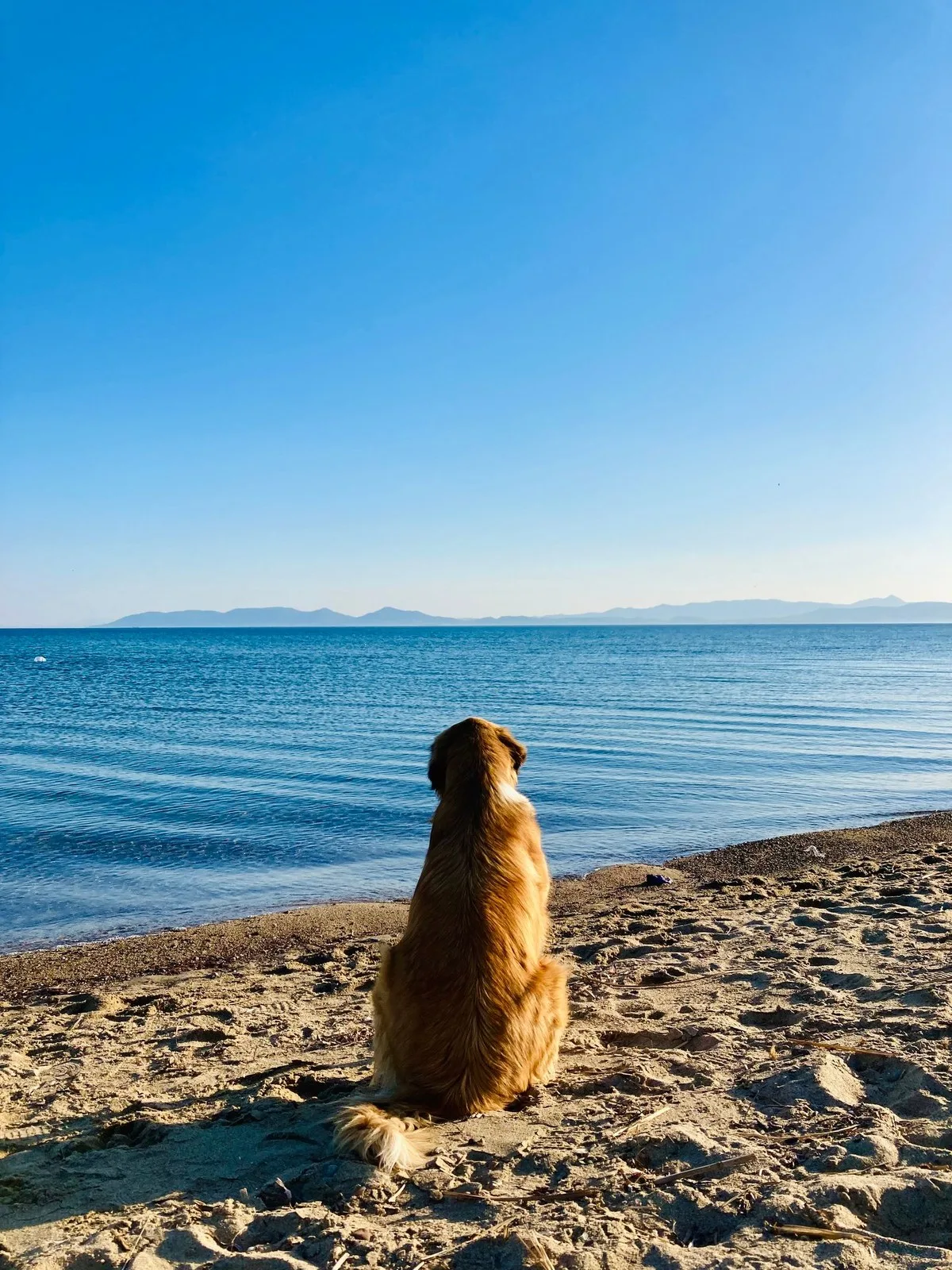
The apps were PhotoCraft 0.20.2 and EffectCraft 0.21.1. I ran them through their command line and control interfaces, on November 6, 2026, between 23:05 and 23:20 Japan time. So the seconds below are command run times. They are not the time a person needs to click through the same job, and I did not time that.
The jobs are the five things I would actually do in a week: cut a subject out of its background, remove something from a photo, make a photo wider, put a title on it and save it as a PSD file, and render animated text as a video.
The results in one table
| Job | App | Result | Seconds | What I saw |
|---|---|---|---|---|
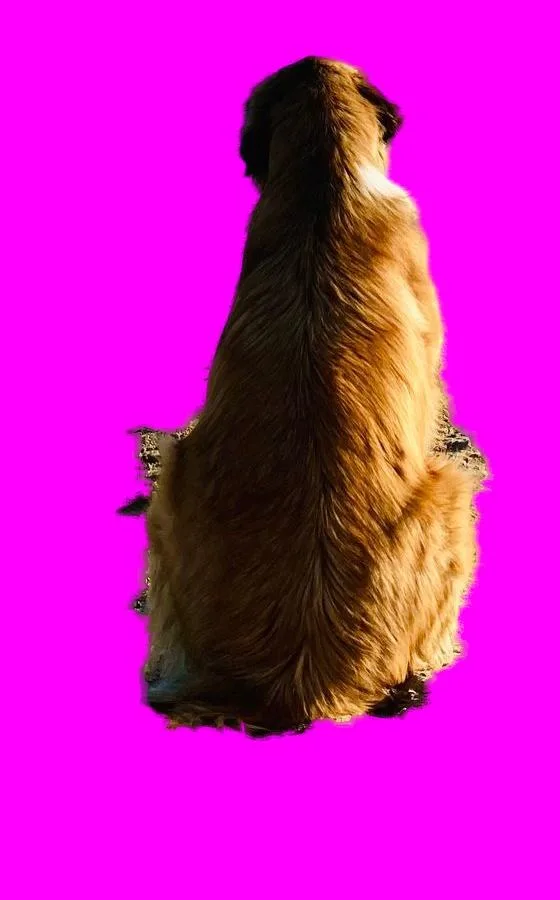
| 1. Cut the dog out | PhotoCraft, Remove Background | Broke | 4.7 | The dog stayed. Only the top half of the sky was erased. |
| 1. Cut the dog out | PhotoCraft, Object Selection + Refine Edge | Partly | 3.3 | The fur came out clean, but the tail was clipped and sand stayed beside the feet. |
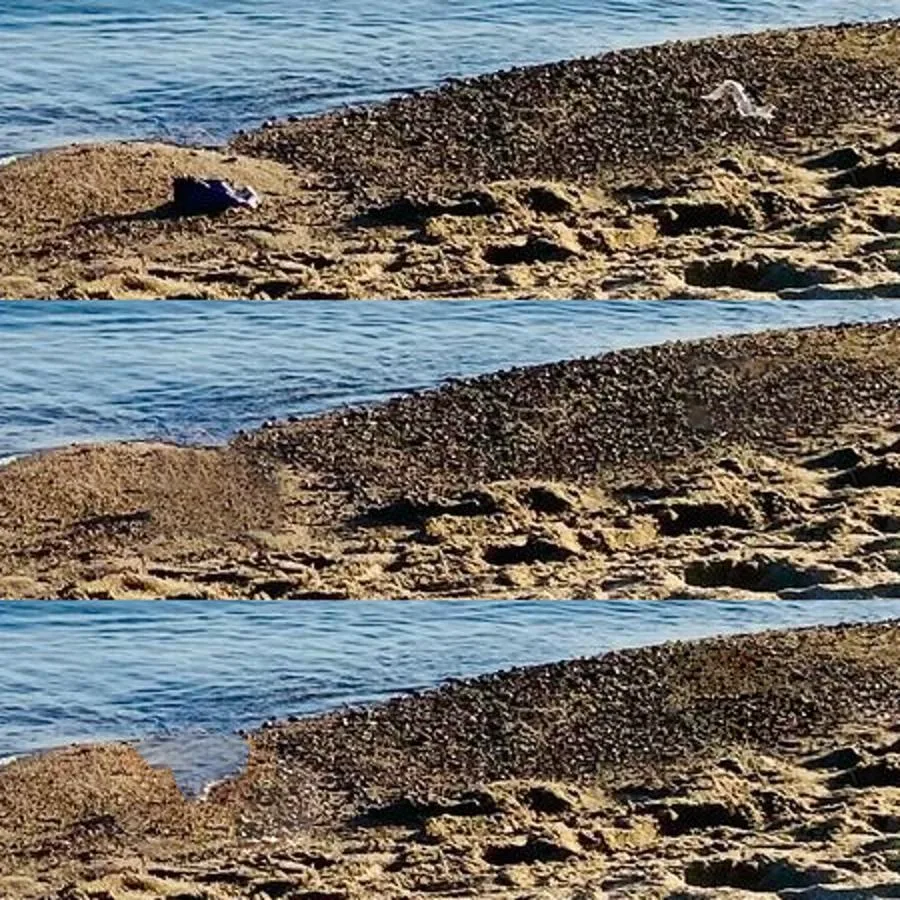
| 2. Remove trash | PhotoCraft, selection + Content-Aware Fill | Worked | 2.0 | A blue piece and a white piece of trash vanished. I could barely see where they had been. |
| 2. Remove trash | PhotoCraft, Remove brush | Worked | 1.8 | The trash went, but the color of the sea bled into the sand. |
| 3. Make it wider | PhotoCraft, crop to 16:9 + Content-Aware fill | Broke | 6.3 | A second dog appeared on the left, and there were seams in the sky and the sea. |
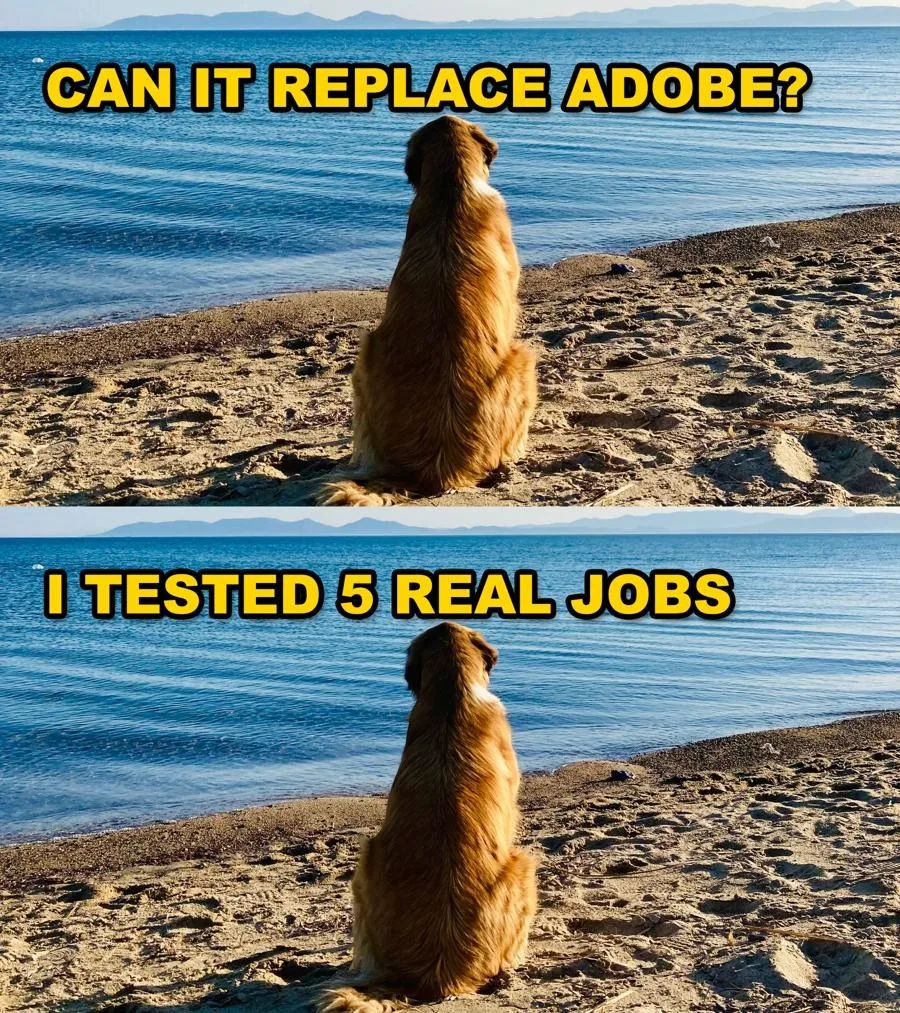
| 4. Title + PSD | PhotoCraft, text layer + Stroke + Drop Shadow | Worked | 0.9 | An outlined, shadowed title. I reopened the saved PSD and rewrote the text. |
| 5. Text animation | EffectCraft, After Effects script, H.264 and ProRes 4444 | Worked | 0.07 to build, 5.9 to render | Letters appeared one by one over 5 seconds, 150 frames. The outline did not show up. |
My score is the one in the video: three worked (trash, title with PSD, text animation) and two broke (the cutout and the wider photo). For the cutout, I counted the hand-drawn selection as broken too, because I would end up fixing it by hand.
Job 1: cut the dog out of the background
I started with the one-click tool, Remove Background. It failed. It erased only the top half of the sky and left the rest of the beach behind. 4.7 seconds.
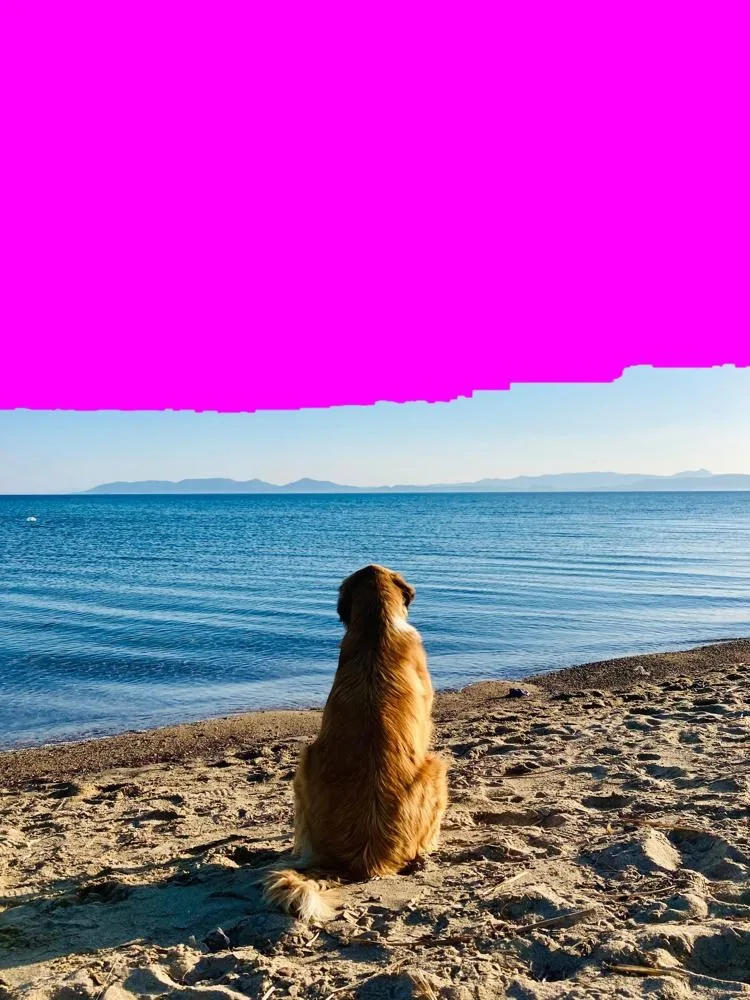
So I selected the dog by hand with Object Selection, drew a box around the dog, and ran Refine Edge. That was better: the fur came out clean. But the tail was clipped, and sand stayed on both sides of the feet. 3.3 seconds. I would still be fixing it by hand, so I call this job broken.
One thing from the makers' own pages explains the first result. PhotoCraft's parity assessment (read November 16, 2026) says its Select Subject and Select Sky are classical, not machine learning: "Select Subject/Sky are heuristic, not ML". There is also a Background Removal tool in ArtCraft's own app, which I did not run.
To repeat it on your own photo: open the photo in PhotoCraft, run Remove Background once, then undo and use Object Selection with a box around the subject, then Refine Edge. Look at the hair, the tail and the feet at 100 percent.
Job 2: remove the trash from the beach
This one worked. I selected the blue trash and the white trash, ran Content-Aware Fill, and 2.0 seconds later I could barely see where they had been. The Remove brush was almost as fast, 1.8 seconds, but the color of the sea bled into the sand.
There is a second half to this job, where an AI paints the gap (Photoshop calls it Generative Fill). In ArtCraft that is the main app's Image Editor, a canvas with an AI prompt bar, and it costs credits. I had zero credits, so I did not generate. The same goes for Photoshop, which asked me to sign in.
To repeat it: select the thing with a selection tool, run Content-Aware Fill, and zoom in on the edge between sand and sea. Then undo and try the Remove brush on the same spot, and compare.
Job 3: make the photo wider, to 16 by 9
It did it, and it broke. 6.3 seconds later, a second dog had appeared on the left, and there were seams in the sky and the sea. I widened the canvas with Crop to 16:9 and filled the new area with Content-Aware.
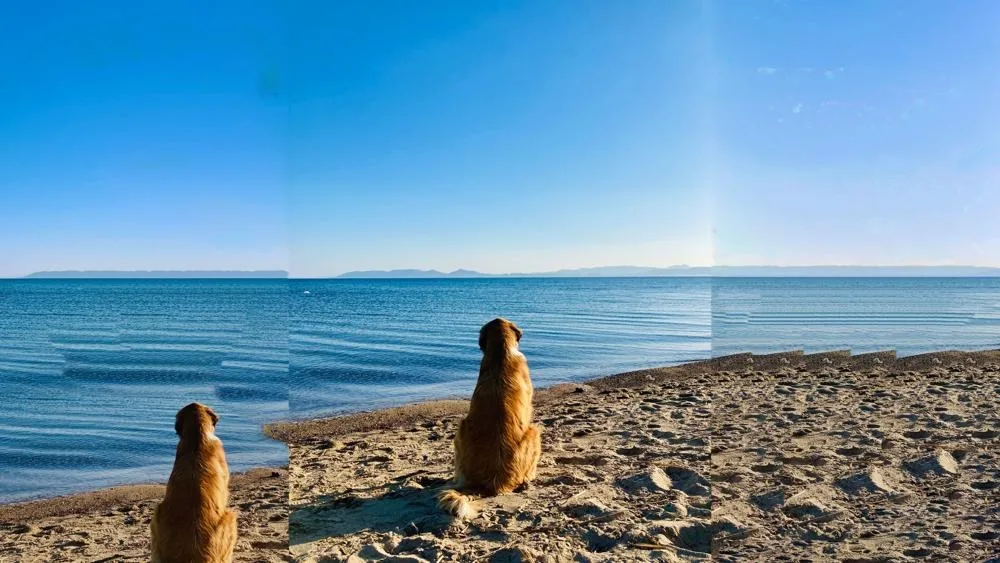
Photoshop has a version where an AI draws the new edges (Generative Expand). PhotoCraft does not. Its parity assessment lists "no Generative Fill/Expand" among its gaps. It only fills from the pixels already there, which is where the second dog came from. I did not test ArtCraft's main app for this one, because generating needs paid credits.
Job 4: a title with an outline and a shadow, saved as a PSD file
This worked, in 0.9 seconds. I put a text layer on the photo, added Stroke and Drop Shadow, and saved it as both a PSD and a PNG. Then I opened the saved PSD again and rewrote the title. The text was still editable.
What the README says about PSD files (read November 16, 2026): re-saving keeps the render of 307 of the 309 files in the psd-tools test set. It also says a re-saved file is not byte for byte the same as its source. I only reopened the PSD in PhotoCraft itself. I did not open it in Photoshop, so I cannot say how it behaves there.
Job 5: animated text, rendered as a video
This is After Effects territory. EffectCraft, the sister app, ran an After Effects script (ExtendScript) without a single change. Letters appeared one by one over 5 seconds, 150 frames. Building the composition took 0.07 seconds and the render took 5.9 seconds. I rendered an H.264 MP4 (about 266 KB) and a ProRes 4444 MOV (about 30 MB) that carries transparency. I ran it twice and the file sizes came out identical. The outline I asked for did not show up.
After Effects is not installed on this Mac. There is only a Topaz plug-in folder. So there is no side by side here either, and this is the free app alone again.
The makers are plain about how young it is. EffectCraft's README says its first commit was on 1 October 2026, that it is in alpha, and that "It isn't yet recommended for production client work." It also says that proprietary project formats and After Effects SDK plug-ins are not supported. I did not test whether an After Effects project file opens in it.
Why it breaks when every menu item is there
PhotoCraft has a checklist of Photoshop's menu items. When I made the video it said 660 of 660 were live. When I re-read it on November 16, it said 664 of 664 (100.0 percent). So why do two of my jobs still break?
Think of a restaurant that copied every dish on a famous menu. Copying the menu is the quick part. Whether the kitchen cooks each dish the same way is a different question. The makers say it themselves. The README says every Photoshop menu item is wired to a command, "but that measures wiring, not behaviour". The button is there. That does not mean it does the same thing.
My read on the two that broke is this. Cutting out a dog and extending a sky ask the program to decide things. Where does the fur end? What does the sea look like past the edge? The jobs that worked are closer to following instructions: fill this hole, put this text here, run this script.
What the makers say about how finished it is
All of this is from the makers' own pages, read on November 16, 2026. These are their estimates, not my measurements.
| Statement | Where it is |
|---|---|
| "It is not yet a Photoshop replacement for daily professional work." PhotoCraft is in early alpha. | PhotoCraft README, Status |
| "Ready for real work" is about 45 percent (range 40 to 50 percent). Feature breadth is about 76 percent. | PhotoCraft docs/target-app-parity.md |
| About 2,300 to 4,100 AI agent hours (Opus 5.5) remain to full parity. | PhotoCraft docs/target-app-parity.md |
| AI and generative features are the biggest gap: classical Select Subject and Sky, a Remove tool, Content-Aware, and no Generative Fill or Expand. | PhotoCraft docs/target-app-parity.md |
| EffectCraft: first commit on 1 October 2026, alpha, about 45 percent of the way to full professional production work, not recommended for production client work yet. | EffectCraft README, Where it stands |
My three out of five is in the same neighborhood as their 45 percent. Five jobs on one photo is a small test, and I am not claiming more than that. But the two views point the same way.
What it costs
The apps themselves are free and open source. The AI generation in ArtCraft's main app is paid by credits. From the pricing page (read November 16, 2026, prices in USD):
| Plan | Monthly price | Billed yearly | Credits per month |
|---|---|---|---|
| Basic | $10 | $8 a month ($96 a year) | 1,000 |
| Pro | $35 | $28 a month ($336 a year) | 3,750 |
| Max | $60 | $48 a month ($576 a year) | 6,600 |
The page also says ArtCraft can be used without paying for a subscription. So free has a limit, but the limit is the AI part. I did not compare against Adobe's prices. I could not get Adobe's US price page on the day, so I do not quote it.
What I would move today, and what I would keep on Adobe
If your work is removing objects, adding titles, saving PSD files, or text animation, you can try the free apps today. For cutouts and wider photos, I would keep Adobe open.
Try it on your own files
This is the check I would run:
- Take one real file. Use a copy, not your only original.
- Run the job you do most.
- If it finishes and you can still edit the result afterward, move that job.
- If it finishes but the result is off, like my second dog, keep paying for that job until it is not.
What I did not run
| Not run | Why |
|---|---|
| Every job in Photoshop 2025 | It showed a sign-in screen, so I stopped. |
| The text animation in After Effects | After Effects is not installed on this Mac. |
| AI fill and AI extend in ArtCraft's main app | They need paid credits, and I had zero. |
| Adobe's US prices | I could not get Adobe's US price page on the day. |
| Opening the PSD in Photoshop | I only reopened it in PhotoCraft. |
| Timing a person at the screen | My seconds are command run times. |
| More than one photo | Five jobs on one photo is a small test. |
So, can it replace Adobe? Not yet. Not for daily client work. AI can clone what you built. It cannot clone you showing up to fix it.
Sources:
- PhotoCraft README, Status and PSD sections (github.com/storytold/photocraft), read November 16, 2026
- PhotoCraft docs/target-app-parity.md and docs/parity-checklist.md, read November 16, 2026
- EffectCraft README, Where it stands (github.com/storytold/effectcraft), read November 16, 2026
- ArtCraft pricing page (getartcraft.com/pricing), read November 16, 2026
- My own runs of PhotoCraft 0.20.2 and EffectCraft 0.21.1 on November 6, 2026, one photo (Pexels 25745179)